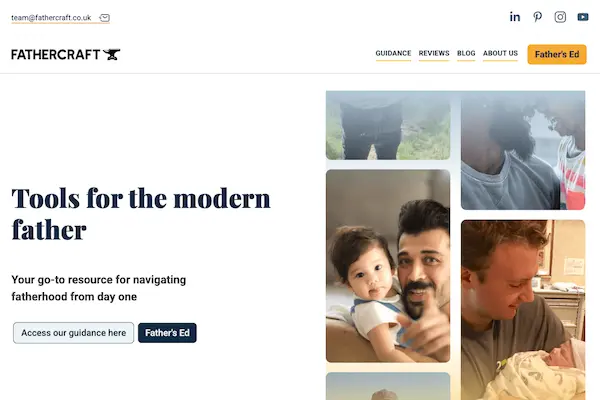
Fathercraft UK is an offshoot of the more well known Fathercraft brand in the US. They share the same name, similar theme, branding and the aim is similar: to provide practical learning resources for first time fathers. It also advocates for more legislation regarding equitable parental statutory entitlement for their respective countries. The website provides resources and support typically for fathers, including blog posts, reviews, and a paid e-learning video-based platform.
From April to July 2025, I volunteered to deliver the refresh of the UK website. I wanted to gain project experience with Webflow and give back to a cause personal to me.
Unfortunately, the Co-Founders have hidden the site due to management issues so the frontend can’t be shown.
The situation prior to my involvement
The current team consists of a business admin manager/ volunteer, the two Founders and a press marketing volunteer. The Webflow project was built but they wanted to:
-
make the design of templates and landing pages more consistent and professional;
-
funnel users to the father’s ed and contact us conversion pages;
-
collaborate with volunteers working on marketing, social media, content creation, Bubble.io app development and e-learning platform. All of these arms of the organisation need to have a space on the website.
From kick-off meetings, it was apparent that the website key statement was not clearly communicated nor what users were expected to do - it wasn’t easy to find what you were looking for.
The task to accomplish
-
Improve the header navigation design to be more visually appealing and user-friendly.
-
Make the design elements more modern but consistent, mobile responsive as well.
-
Raise the level of web best practice: cms collection data management, SEO, accessibility, and performance.
What actions did I implement?
For the main navigation, I added their social media links and direct email contact whilst maintaining their main nav links in a two-tiered navbar. I made the nav dissapear when scrolling down the page but reappear when scrolling up to give back more screen real-estate to the user.
For overall improvements of design, I drew inspiration from tailwind UI library and rebuilt components using Webflow’s page editor. Fortunately, the CMS has many templates as well to copy from and this was useful for repeat sections like hero headers, two column layouts, and call to action sections.
They had several ‘views’ (collections or list of items) like blogs, reviews, articles, team members, each with their own field data. So I standardised the design with a card component and rendered useful metadata from the collection. One issue I had was that I expected the feature image which does accept an alt text field in the backend, to get rendered through Webflow’s collection list item process but I wasn’t able to achieve this out of the box. I had to use a workaround by adding an additional, required text field and then using that in the image component.
I performed some auditing of their site and found that stock images were being used with large file sizes. Some markup was not semantic and others difficult for a screen reader to interpret e.g. a lot of ‘spacer’ divs used rather than simply using css, as well as incorrect heading hierarchy.
What was the result?
I was given a lot of praise as well as support for my contribution.
The Founders are well versed in business management, marketing and are tech-savvy. They are comfortable using other tools like Webflow and Notion, Penpot design tool which is an open-source alternative to Figma, Hubspot and Bubble app development. This marked a big difference from my previous volunteering where I was one of the only tech people in the organisation.
Unfortunately, the Co-Founders have hidden the site due to management issues so the frontend can’t be shown.